Co -Traveller

OVERVIEW

Co - traveller is designed for seamless group travel, the Co-Traveller feature enables users to add and manage fellow travelers’ details effortlessly, ensuring all essential information stays organized and accessible throughout the journey.

UI minimalistic widgets
An image of a smartphone on top of an eletronic surface

YEAR

2025

ROLE

UX Designer

SERVICES

Feature Revamp & Optimization
UX Research
UI Design
High-Fidelity Prototyping

About Project

Previous Flow

In the previous setup, the user must go through multiple steps to complete the merge process. First, they need to click on the 'View Details' option, after which the co-traveller’s information is displayed. The user then has to carefully review these details, compare them with the existing records, and finally decide whether to proceed with merging or not. Altogether, this flow requires navigating through four distinct steps, which can feel repetitive, time-consuming, and unnecessarily complex for the user.

Problem Statment

Users frequently add the same co-traveller more than once, resulting in duplicate records that clutter the backend and create data inconsistencies. The current experience requires multiple steps to resolve these duplicates, increasing user effort and reducing clarity, efficiency, and overall data accuracy.


Solution

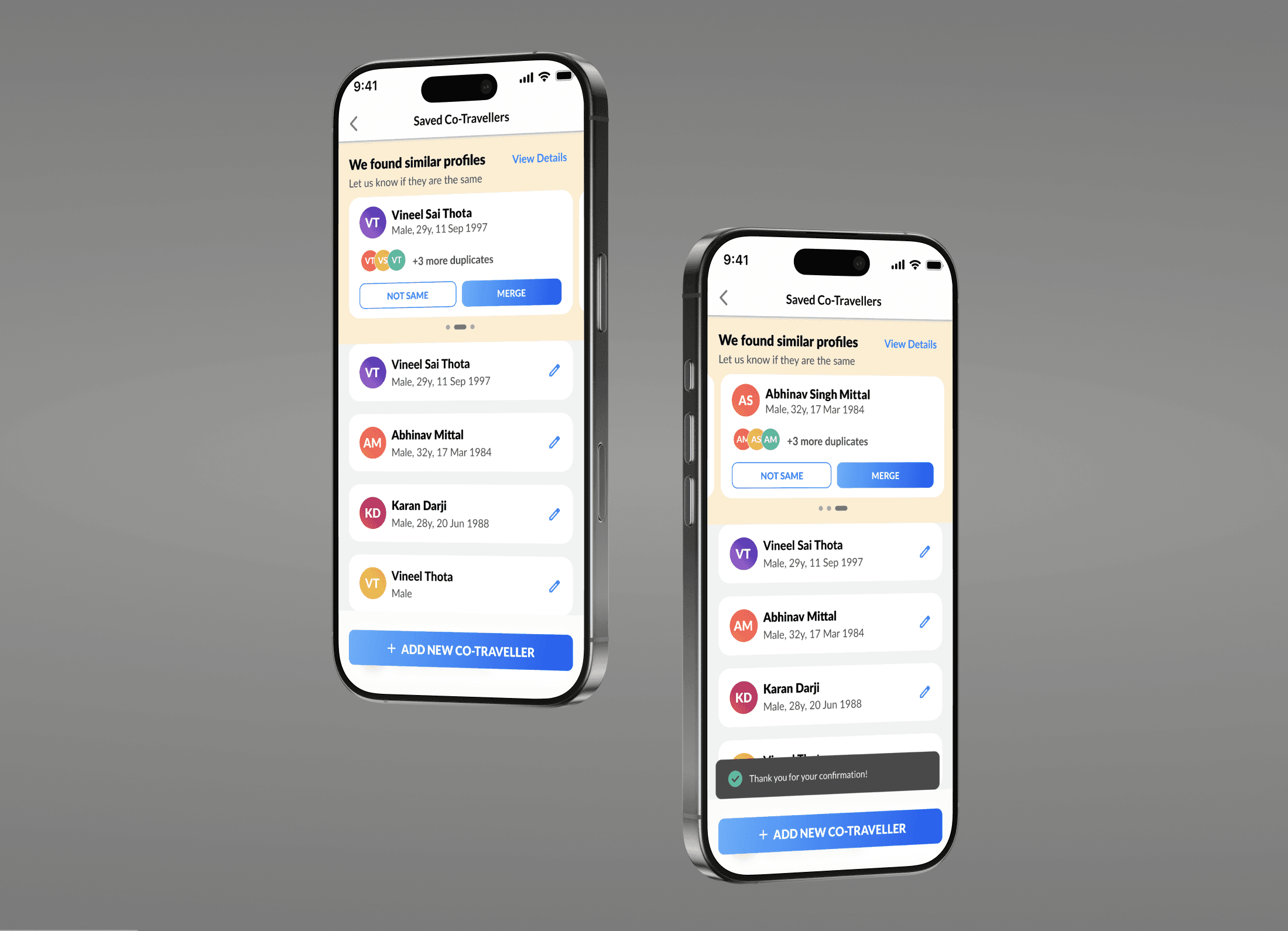
I designed a Co-Traveller Merge Flow that allows users to easily identify and merge duplicate profiles in a single, intuitive interaction. This helps users organize their co-traveller information effortlessly while reducing backend clutter, improving data accuracy, and ensuring a smoother experience for both users and internal systems.

PRD given by Project Manager

Ideation Phase

To drive timely resolution of duplicate entries, I designed a consistent, high-visibility entry point for the Co-Traveller Merge Flow across the Home screen, left navigation, and Profile section. A unified icon, label, and state-aware messaging guide user action while remaining persistent yet non-disruptive, ensuring discoverability without interfering with core user journeys.

Competitors


  • Airbnb – Merges duplicate or overlapping bookings while keeping users informed of potential conflicts.

  • Google Photos – Automatically detects similar photos and offers a “merge” or “clean up” suggestion with previews before confirmation.

  • Apple Photos (iCloud) – Merges duplicate photos using smart detection and provides side-by-side comparisons.

  • Contacts (Google & iPhone) – Offers “Merge Duplicates” with one-tap confirmation and undo options, ensuring clarity and control.

  • LinkedIn – Combines duplicate accounts through a step-by-step merge confirmation flow.


MoodBoard

This moodboard explores various visual directions and design inspirations for the MakeMyTrip co - traveler Flow project. It brings together ideas focused on clarity, consistency, and user trust, drawing from travel interfaces, data integration systems, and clean UI styles to create a seamless and intuitive experience.


Thumbnail

WireFrame

Entry Points

To drive timely resolution of duplicate entries, I designed a consistent, high-visibility entry point for the Co-Traveller Merge Flow across the Home screen, left navigation, and Profile section. A unified icon, label, and state-aware messaging guide user action while remaining persistent yet non-disruptive, ensuring discoverability without interfering with core user journeys.

image of a smartphone leaning on top of a record player
UI minimalistic widgets

Co - Traveller

Merge

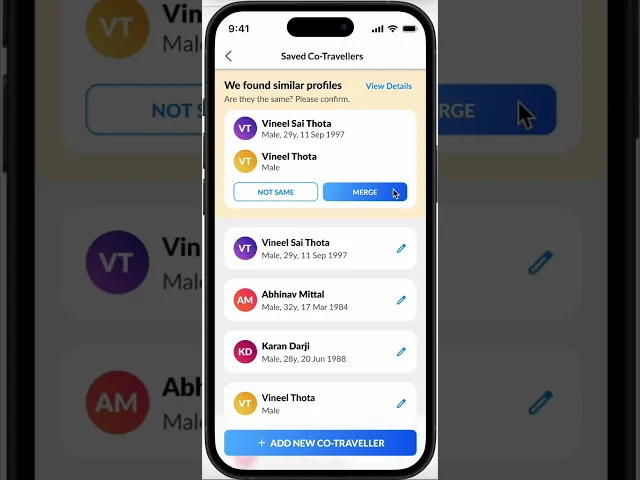
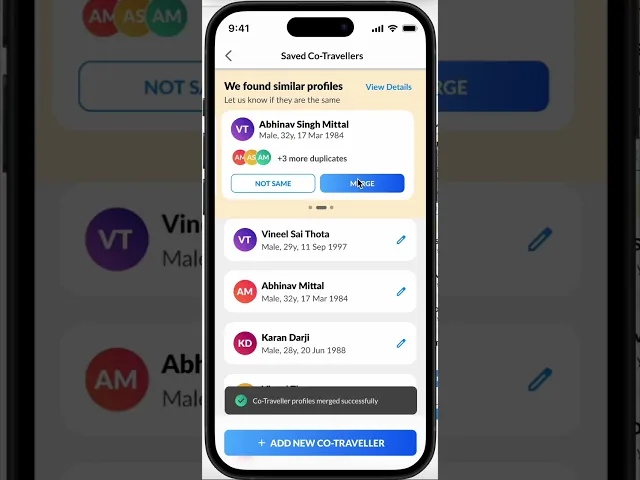
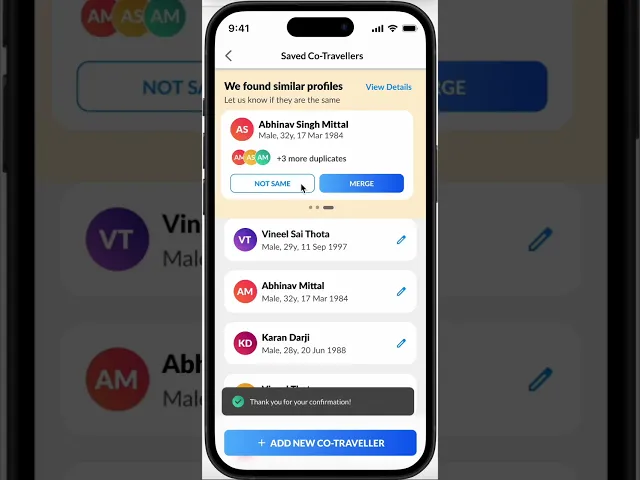
The Merge Flow empowers users to quickly identify duplicate co-traveller profiles, compare key details, and confidently merge them into a single, accurate record when they represent the same individual. This reduces data redundancy while giving users clear control over their information.

Not Same

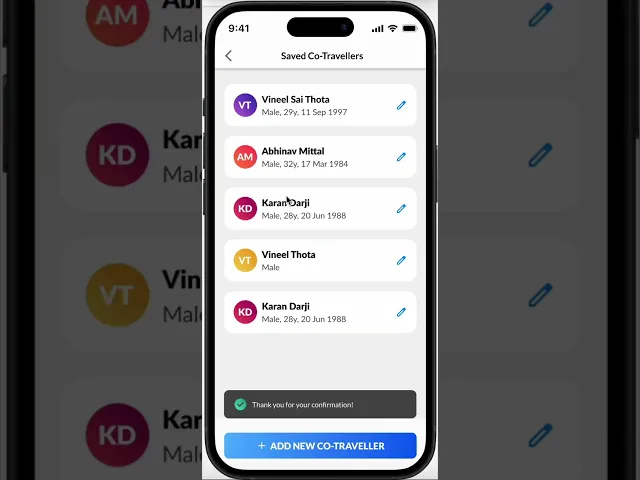
The “Not Same” flow allows users to review flagged co-traveller profiles and clearly indicate when they belong to different individuals. By explicitly marking profiles as Not Same, users retain separation between records, preventing incorrect merges while maintaining data accuracy and user trust.

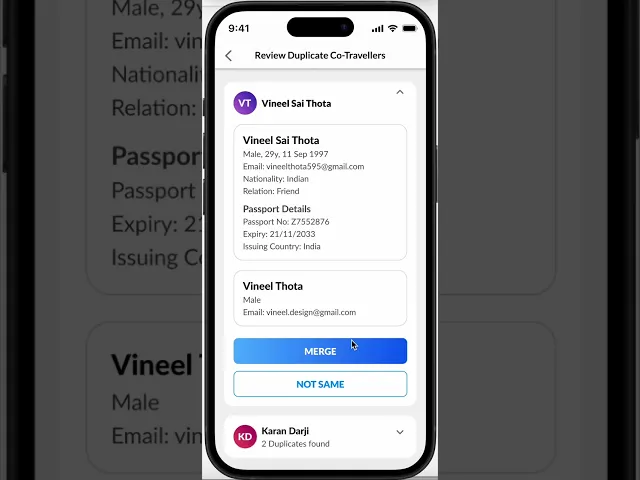
View Detailes - Merge Flow

The “View Details” flow gives users access to comprehensive profile information for deeper review. After evaluating all relevant details, users can confidently confirm whether the profiles represent the same individual and proceed with merging, ensuring informed decisions and accurate data consolidation.

View Detailes - Not Same Flow

In the “View Details” flow, users can access comprehensive information about the profiles. After reviewing all the details, if they conclude that the profiles belong to different individuals, they can choose not to merge, ensuring the profiles remain separate.

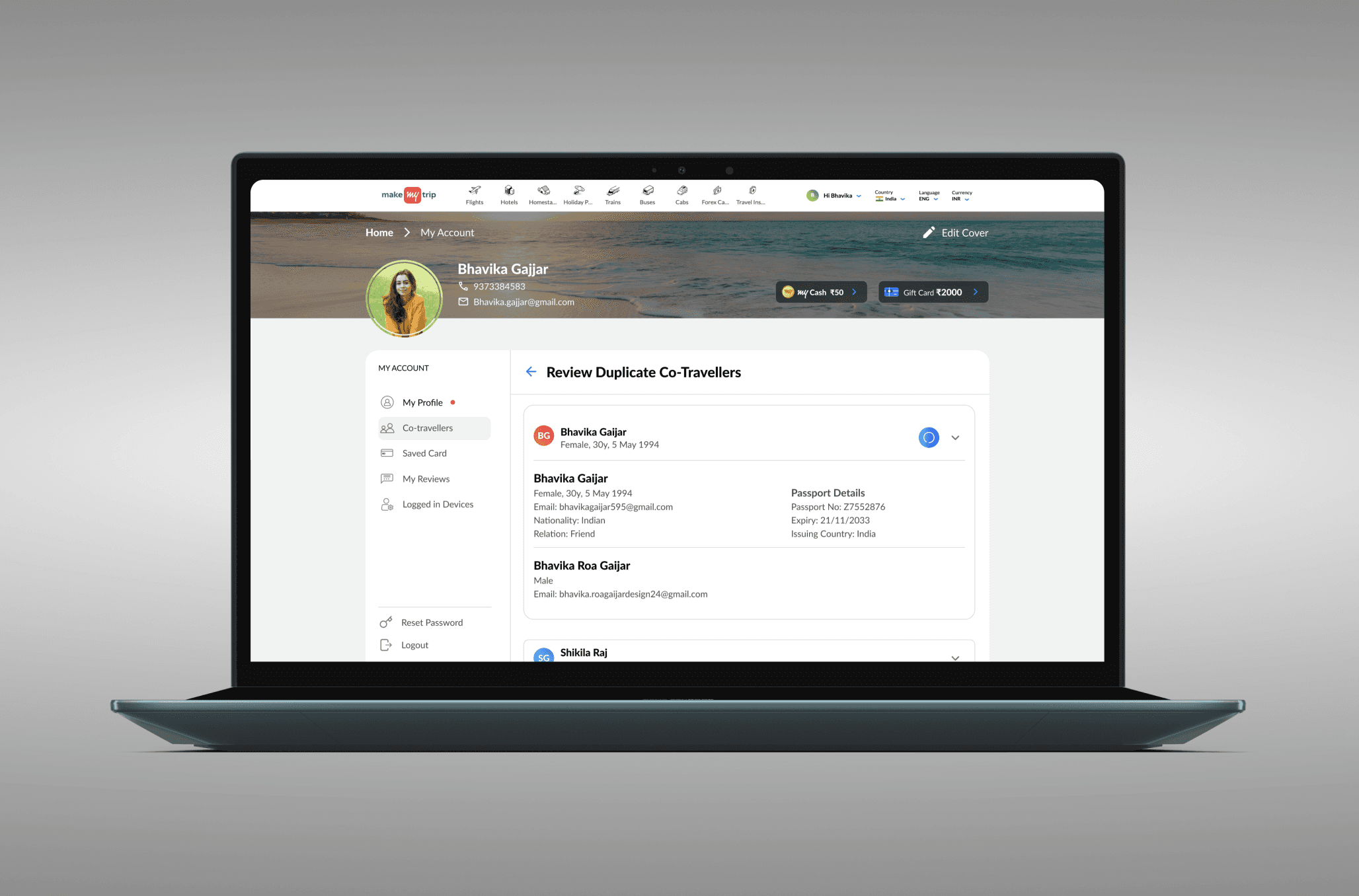
Entry Points - Desktop

To ensure high discoverability, co-traveller duplicate prompts are surfaced at key decision moments across the Home page with a tool tip and Profile dropdown. Consistent labelling and visual cues guide users to review and resolve duplicates seamlessly, without disrupting their booking flow.

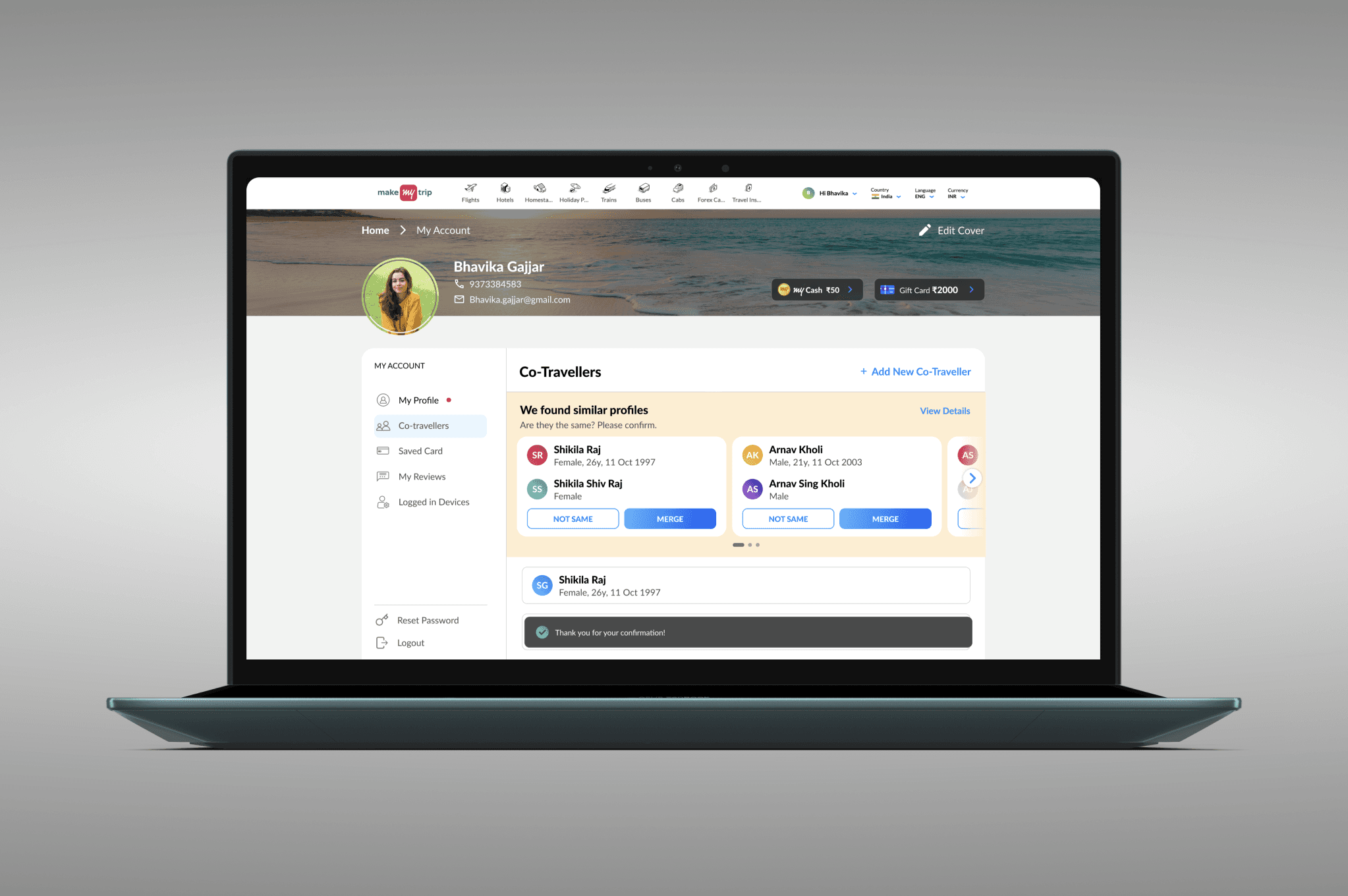
Co Traveller - Desktop

On desktop, the Co-Traveller Flow scales with duplicate volume. A single duplicate appears as one comparison card, two duplicates are shown as side-by-side cards, and multiple duplicates are organized within a carousel, maintaining clarity and ease of decision-making.

Merge

Not Same

View Details

User Analytics - 20 Aug – 15 Sep

Impact & Results
Since launch, over 4.1 million co-traveller accounts have been analyzed. Between August 20 and September 15 (New Design Release), 2,237 users successfully merged duplicate profiles, while 1,369 users intentionally chose to keep profiles separate. These outcomes indicate strong user adoption, improved decision clarity, and a more efficient, user-driven resolution of duplicate data.

Co -Traveller

OVERVIEW

Co - traveller is designed for seamless group travel, the Co-Traveller feature enables users to add and manage fellow travelers’ details effortlessly, ensuring all essential information stays organized and accessible throughout the journey.

UI minimalistic widgets
An image of a smartphone on top of an eletronic surface

YEAR

2025

ROLE

UX Designer

SERVICES

Feature Revamp & Optimization
UX Research
UI Design
High-Fidelity Prototyping

About Project

Previous Flow

In the previous setup, the user must go through multiple steps to complete the merge process. First, they need to click on the 'View Details' option, after which the co-traveller’s information is displayed. The user then has to carefully review these details, compare them with the existing records, and finally decide whether to proceed with merging or not. Altogether, this flow requires navigating through four distinct steps, which can feel repetitive, time-consuming, and unnecessarily complex for the user.

Problem Statment

Users frequently add the same co-traveller more than once, resulting in duplicate records that clutter the backend and create data inconsistencies. The current experience requires multiple steps to resolve these duplicates, increasing user effort and reducing clarity, efficiency, and overall data accuracy.


Solution

I designed a Co-Traveller Merge Flow that allows users to easily identify and merge duplicate profiles in a single, intuitive interaction. This helps users organize their co-traveller information effortlessly while reducing backend clutter, improving data accuracy, and ensuring a smoother experience for both users and internal systems.

PRD given by Project Manager

Ideation Phase

To drive timely resolution of duplicate entries, I designed a consistent, high-visibility entry point for the Co-Traveller Merge Flow across the Home screen, left navigation, and Profile section. A unified icon, label, and state-aware messaging guide user action while remaining persistent yet non-disruptive, ensuring discoverability without interfering with core user journeys.

Competitors


  • Airbnb – Merges duplicate or overlapping bookings while keeping users informed of potential conflicts.

  • Google Photos – Automatically detects similar photos and offers a “merge” or “clean up” suggestion with previews before confirmation.

  • Apple Photos (iCloud) – Merges duplicate photos using smart detection and provides side-by-side comparisons.

  • Contacts (Google & iPhone) – Offers “Merge Duplicates” with one-tap confirmation and undo options, ensuring clarity and control.

  • LinkedIn – Combines duplicate accounts through a step-by-step merge confirmation flow.


MoodBoard

This moodboard explores various visual directions and design inspirations for the MakeMyTrip co - traveler Flow project. It brings together ideas focused on clarity, consistency, and user trust, drawing from travel interfaces, data integration systems, and clean UI styles to create a seamless and intuitive experience.


Thumbnail

WireFrame

Entry Points

To drive timely resolution of duplicate entries, I designed a consistent, high-visibility entry point for the Co-Traveller Merge Flow across the Home screen, left navigation, and Profile section. A unified icon, label, and state-aware messaging guide user action while remaining persistent yet non-disruptive, ensuring discoverability without interfering with core user journeys.

image of a smartphone leaning on top of a record player
UI minimalistic widgets

Co - Traveller

Merge

The Merge Flow empowers users to quickly identify duplicate co-traveller profiles, compare key details, and confidently merge them into a single, accurate record when they represent the same individual. This reduces data redundancy while giving users clear control over their information.

Not Same

The “Not Same” flow allows users to review flagged co-traveller profiles and clearly indicate when they belong to different individuals. By explicitly marking profiles as Not Same, users retain separation between records, preventing incorrect merges while maintaining data accuracy and user trust.

View Detailes - Merge Flow

The “View Details” flow gives users access to comprehensive profile information for deeper review. After evaluating all relevant details, users can confidently confirm whether the profiles represent the same individual and proceed with merging, ensuring informed decisions and accurate data consolidation.

View Detailes - Not Same Flow

In the “View Details” flow, users can access comprehensive information about the profiles. After reviewing all the details, if they conclude that the profiles belong to different individuals, they can choose not to merge, ensuring the profiles remain separate.

Entry Points - Desktop

To ensure high discoverability, co-traveller duplicate prompts are surfaced at key decision moments across the Home page with a tool tip and Profile dropdown. Consistent labelling and visual cues guide users to review and resolve duplicates seamlessly, without disrupting their booking flow.

Co Traveller - Desktop

On desktop, the Co-Traveller Flow scales with duplicate volume. A single duplicate appears as one comparison card, two duplicates are shown as side-by-side cards, and multiple duplicates are organized within a carousel, maintaining clarity and ease of decision-making.

Merge

Not Same

View Details

User Analytics - 20 Aug – 15 Sep

Impact & Results
Since launch, over 4.1 million co-traveller accounts have been analyzed. Between August 20 and September 15 (New Design Release), 2,237 users successfully merged duplicate profiles, while 1,369 users intentionally chose to keep profiles separate. These outcomes indicate strong user adoption, improved decision clarity, and a more efficient, user-driven resolution of duplicate data.

Co -Traveller

OVERVIEW

Co - traveller is designed for seamless group travel, the Co-Traveller feature enables users to add and manage fellow travelers’ details effortlessly, ensuring all essential information stays organized and accessible throughout the journey.

UI minimalistic widgets
An image of a smartphone on top of an eletronic surface

YEAR

2025

ROLE

UX Designer

SERVICES

Feature Revamp & Optimization
UX Research
UI Design
High-Fidelity Prototyping

About Project

Previous Flow

In the previous setup, the user must go through multiple steps to complete the merge process. First, they need to click on the 'View Details' option, after which the co-traveller’s information is displayed. The user then has to carefully review these details, compare them with the existing records, and finally decide whether to proceed with merging or not. Altogether, this flow requires navigating through four distinct steps, which can feel repetitive, time-consuming, and unnecessarily complex for the user.

Problem Statment

Users frequently add the same co-traveller more than once, resulting in duplicate records that clutter the backend and create data inconsistencies. The current experience requires multiple steps to resolve these duplicates, increasing user effort and reducing clarity, efficiency, and overall data accuracy.


Solution

I designed a Co-Traveller Merge Flow that allows users to easily identify and merge duplicate profiles in a single, intuitive interaction. This helps users organize their co-traveller information effortlessly while reducing backend clutter, improving data accuracy, and ensuring a smoother experience for both users and internal systems.

PRD given by Project Manager

Ideation Phase

To drive timely resolution of duplicate entries, I designed a consistent, high-visibility entry point for the Co-Traveller Merge Flow across the Home screen, left navigation, and Profile section. A unified icon, label, and state-aware messaging guide user action while remaining persistent yet non-disruptive, ensuring discoverability without interfering with core user journeys.

Competitors


  • Airbnb – Merges duplicate or overlapping bookings while keeping users informed of potential conflicts.

  • Google Photos – Automatically detects similar photos and offers a “merge” or “clean up” suggestion with previews before confirmation.

  • Apple Photos (iCloud) – Merges duplicate photos using smart detection and provides side-by-side comparisons.

  • Contacts (Google & iPhone) – Offers “Merge Duplicates” with one-tap confirmation and undo options, ensuring clarity and control.

  • LinkedIn – Combines duplicate accounts through a step-by-step merge confirmation flow.


MoodBoard

This moodboard explores various visual directions and design inspirations for the MakeMyTrip co - traveler Flow project. It brings together ideas focused on clarity, consistency, and user trust, drawing from travel interfaces, data integration systems, and clean UI styles to create a seamless and intuitive experience.


Thumbnail

WireFrame

Entry Points

To drive timely resolution of duplicate entries, I designed a consistent, high-visibility entry point for the Co-Traveller Merge Flow across the Home screen, left navigation, and Profile section. A unified icon, label, and state-aware messaging guide user action while remaining persistent yet non-disruptive, ensuring discoverability without interfering with core user journeys.

image of a smartphone leaning on top of a record player
UI minimalistic widgets

Co - Traveller

Merge

The Merge Flow empowers users to quickly identify duplicate co-traveller profiles, compare key details, and confidently merge them into a single, accurate record when they represent the same individual. This reduces data redundancy while giving users clear control over their information.

Not Same

The “Not Same” flow allows users to review flagged co-traveller profiles and clearly indicate when they belong to different individuals. By explicitly marking profiles as Not Same, users retain separation between records, preventing incorrect merges while maintaining data accuracy and user trust.

View Detailes - Merge Flow

The “View Details” flow gives users access to comprehensive profile information for deeper review. After evaluating all relevant details, users can confidently confirm whether the profiles represent the same individual and proceed with merging, ensuring informed decisions and accurate data consolidation.

View Detailes - Not Same Flow

In the “View Details” flow, users can access comprehensive information about the profiles. After reviewing all the details, if they conclude that the profiles belong to different individuals, they can choose not to merge, ensuring the profiles remain separate.

Entry Points - Desktop

To ensure high discoverability, co-traveller duplicate prompts are surfaced at key decision moments across the Home page with a tool tip and Profile dropdown. Consistent labelling and visual cues guide users to review and resolve duplicates seamlessly, without disrupting their booking flow.

Co Traveller - Desktop

On desktop, the Co-Traveller Flow scales with duplicate volume. A single duplicate appears as one comparison card, two duplicates are shown as side-by-side cards, and multiple duplicates are organized within a carousel, maintaining clarity and ease of decision-making.

Merge

Not Same

View Details

User Analytics - 20 Aug – 15 Sep

Impact & Results
Since launch, over 4.1 million co-traveller accounts have been analyzed. Between August 20 and September 15 (New Design Release), 2,237 users successfully merged duplicate profiles, while 1,369 users intentionally chose to keep profiles separate. These outcomes indicate strong user adoption, improved decision clarity, and a more efficient, user-driven resolution of duplicate data.

Create a free website with Framer, the website builder loved by startups, designers and agencies.