Live Activities - Flights

OVERVIEW

Flight Live Activities deliver real-time, glanceable flight updates directly on the lock screen. Key details such as departure and arrival times, gate and terminal information, delays, and flight status are surfaced contextually, enabling travellers to stay informed throughout their journey without needing to open the app.

A black and white image of a handrawn logo
Image of a Gray to white soft gradient

YEAR

2025

ROLE

UX Designer

SERVICES

Feature Revamp & Optimization
UX Research
UI Design

About Project

Previous Flow

The earlier Live Activity experience surfaced only minimal flight information, lacking real-time updates and actionable context. Critical alerts were not prioritized, and essential details such as gate or terminal changes were buried, reducing clarity and usefulness during time-sensitive travel moments.

Problem Statment

Travelers frequently miss critical last-minute flight updates such as terminal changes, airport shifts, or baggage transfer instructions due to low-visibility notifications. This results in confusion and delays. The challenge was to design a high priority, glanceable notification experience that surfaces urgent information instantly, without requiring users to open the app.


Solution

To address these gaps, I redesigned the Live Activities experience to surface real-time flight updates in a clear, actionable, and high-visibility format. The updated layout prioritizes critical information such as delays, terminal changes, arrivals, and baggage updates directly on the lock screen and Dynamic Island, enabling faster awareness and confident decision-making.

PRD given by Project Manager

Ideation Phase

This exploration aimed to enrich the Live Activity experience by incorporating incoming flight details and baggage belt information for added context. While conceptually strong, the layout exceeded iOS Live Activity height constraints (160px), reaching nearly 200px necessitating a full structural redesign to align with platform guidelines.

Competitors


  • Uber: Real-time ride tracking with dynamic progress indicators.

  • Zomato: Live order movement with clear preparation and delivery timelines.

  • Swiggy: End-to-end visibility into food preparation and delivery status.

  • Google Maps: Continuous navigation with live route and travel updates.

  • Delta Airlines App: Real-time flight status with detailed journey progress tracking.


Moodboard

This moodboard captures a range of Live Activity patterns across flights, rides, and food delivery experiences. It highlights how real-time updates, progress indicators, and information hierarchy are communicated at a glance on the lock screen, informing a cleaner, more intuitive, and highly glanceable Live Activity design.

Wireframe

1st Conclusion

This exploration aimed to enrich the Live Activity experience by incorporating incoming flight details and baggage belt information, enabling users to access critical post-arrival updates at a glance. While the concept added meaningful context, it exceeded iOS Live Activity constraints surpassing Apple’s 160px height limit and reaching nearly 200px. This highlighted the need for a structural redesign to balance information density with platform limitations, reinforcing a more scalable, system-compliant layout approach.

Final Design

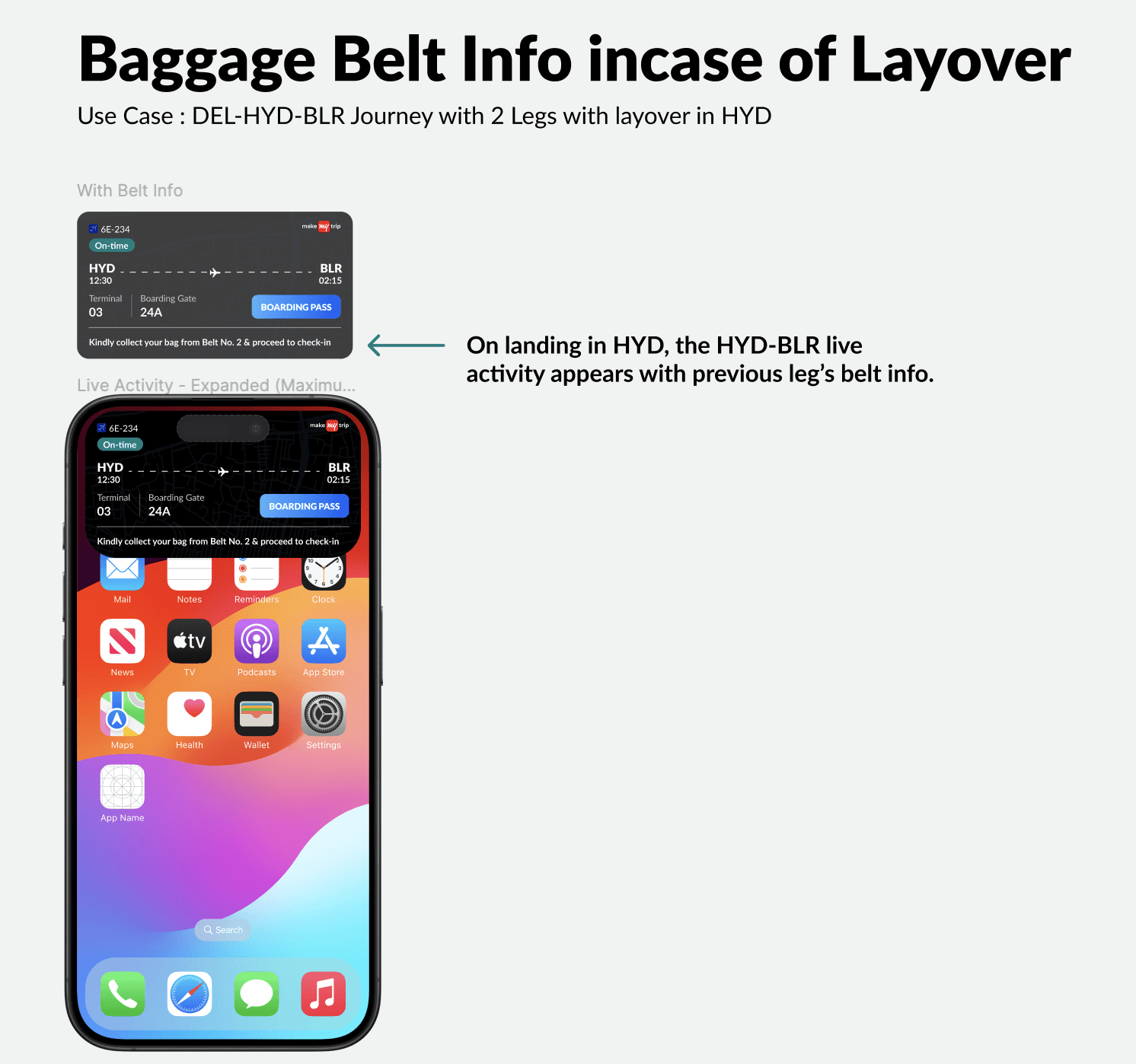
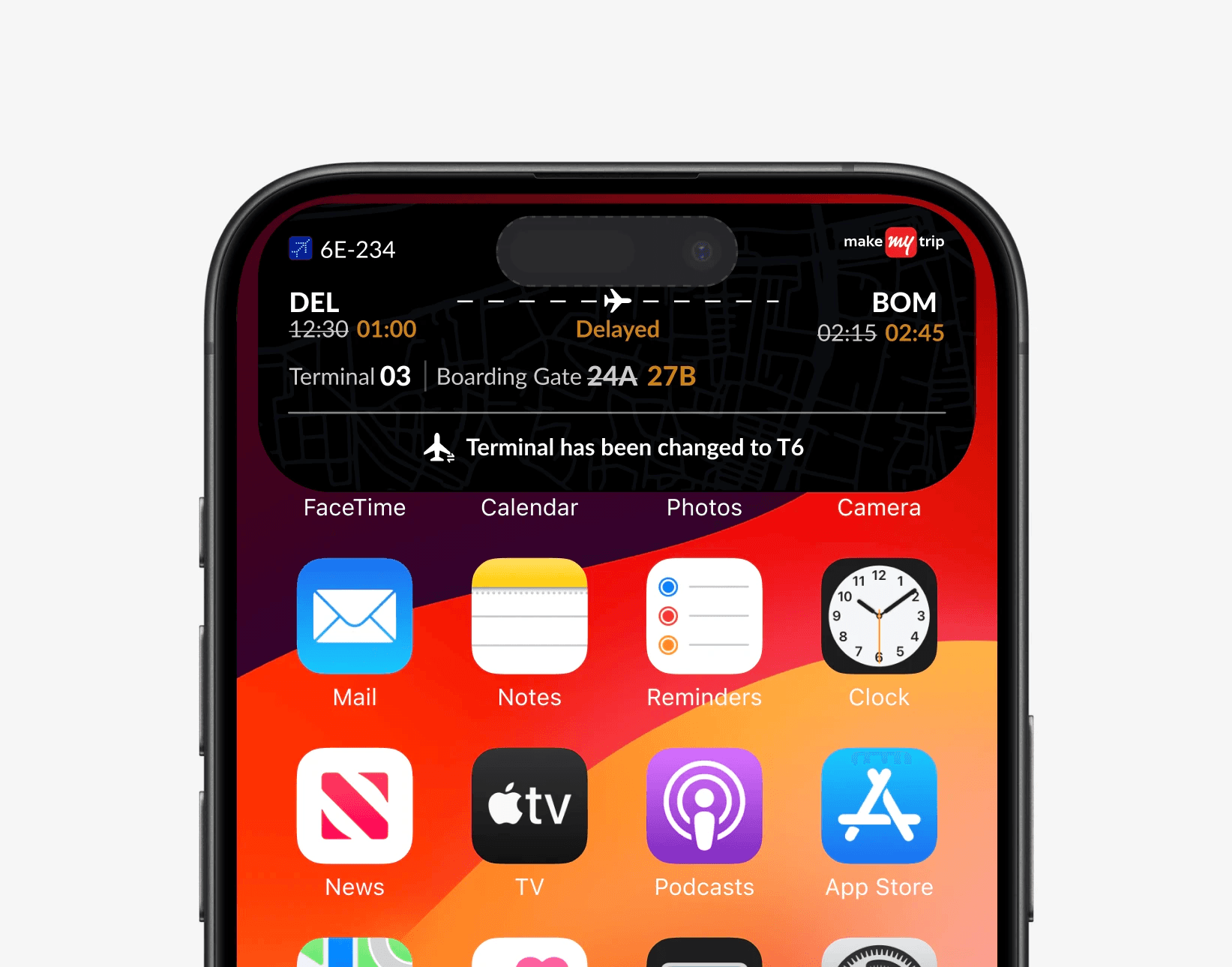
The Live Activities flight revamp introduced a dynamic bottom strip to highlight real-time updates such as arrivals, terminal changes, and baggage transfer requirements. By prioritizing critical updates on the lock screen and keeping core flight details scannable, the design reduced unnecessary app opens, improved visibility of time-sensitive changes, and increased user confidence in receiving accurate, timely flight information.

3-4 hour(s) Before Flight - On Time

Flight Status - On Time

Baggage Claim

3-4 hour(s) Before Flight - Delayed

Flight Status - Delayed

Baggage Claim - Delayed

Watch Design - On Time

Watch Design - Delayed

Live Activities - Flights

OVERVIEW

Flight Live Activities deliver real-time, glanceable flight updates directly on the lock screen. Key details such as departure and arrival times, gate and terminal information, delays, and flight status are surfaced contextually, enabling travellers to stay informed throughout their journey without needing to open the app.

A black and white image of a handrawn logo
Image of a Gray to white soft gradient

YEAR

2025

ROLE

UX Designer

SERVICES

Feature Revamp & Optimization
UX Research
UI Design

About Project

Previous Flow

The earlier Live Activity experience surfaced only minimal flight information, lacking real-time updates and actionable context. Critical alerts were not prioritized, and essential details such as gate or terminal changes were buried, reducing clarity and usefulness during time-sensitive travel moments.

Problem Statment

Travelers frequently miss critical last-minute flight updates such as terminal changes, airport shifts, or baggage transfer instructions due to low-visibility notifications. This results in confusion and delays. The challenge was to design a high priority, glanceable notification experience that surfaces urgent information instantly, without requiring users to open the app.


Solution

To address these gaps, I redesigned the Live Activities experience to surface real-time flight updates in a clear, actionable, and high-visibility format. The updated layout prioritizes critical information such as delays, terminal changes, arrivals, and baggage updates directly on the lock screen and Dynamic Island, enabling faster awareness and confident decision-making.

PRD given by Project Manager

Ideation Phase

This exploration aimed to enrich the Live Activity experience by incorporating incoming flight details and baggage belt information for added context. While conceptually strong, the layout exceeded iOS Live Activity height constraints (160px), reaching nearly 200px necessitating a full structural redesign to align with platform guidelines.

Competitors


  • Uber: Real-time ride tracking with dynamic progress indicators.

  • Zomato: Live order movement with clear preparation and delivery timelines.

  • Swiggy: End-to-end visibility into food preparation and delivery status.

  • Google Maps: Continuous navigation with live route and travel updates.

  • Delta Airlines App: Real-time flight status with detailed journey progress tracking.


Moodboard

This moodboard captures a range of Live Activity patterns across flights, rides, and food delivery experiences. It highlights how real-time updates, progress indicators, and information hierarchy are communicated at a glance on the lock screen, informing a cleaner, more intuitive, and highly glanceable Live Activity design.

Wireframe

1st Conclusion

This exploration aimed to enrich the Live Activity experience by incorporating incoming flight details and baggage belt information, enabling users to access critical post-arrival updates at a glance. While the concept added meaningful context, it exceeded iOS Live Activity constraints surpassing Apple’s 160px height limit and reaching nearly 200px. This highlighted the need for a structural redesign to balance information density with platform limitations, reinforcing a more scalable, system-compliant layout approach.

Final Design

The Live Activities flight revamp introduced a dynamic bottom strip to highlight real-time updates such as arrivals, terminal changes, and baggage transfer requirements. By prioritizing critical updates on the lock screen and keeping core flight details scannable, the design reduced unnecessary app opens, improved visibility of time-sensitive changes, and increased user confidence in receiving accurate, timely flight information.

3-4 hour(s) Before Flight - On Time

Flight Status - On Time

Baggage Claim

3-4 hour(s) Before Flight - Delayed

Flight Status - Delayed

Baggage Claim - Delayed

Watch Design - On Time

Watch Design - Delayed

Live Activities - Flights

OVERVIEW

Flight Live Activities deliver real-time, glanceable flight updates directly on the lock screen. Key details such as departure and arrival times, gate and terminal information, delays, and flight status are surfaced contextually, enabling travellers to stay informed throughout their journey without needing to open the app.

A black and white image of a handrawn logo
Image of a Gray to white soft gradient

YEAR

2025

ROLE

UX Designer

SERVICES

Feature Revamp & Optimization
UX Research
UI Design

About Project

Previous Flow

The earlier Live Activity experience surfaced only minimal flight information, lacking real-time updates and actionable context. Critical alerts were not prioritized, and essential details such as gate or terminal changes were buried, reducing clarity and usefulness during time-sensitive travel moments.

Problem Statment

Travelers frequently miss critical last-minute flight updates such as terminal changes, airport shifts, or baggage transfer instructions due to low-visibility notifications. This results in confusion and delays. The challenge was to design a high priority, glanceable notification experience that surfaces urgent information instantly, without requiring users to open the app.


Solution

To address these gaps, I redesigned the Live Activities experience to surface real-time flight updates in a clear, actionable, and high-visibility format. The updated layout prioritizes critical information such as delays, terminal changes, arrivals, and baggage updates directly on the lock screen and Dynamic Island, enabling faster awareness and confident decision-making.

PRD given by Project Manager

Ideation Phase

This exploration aimed to enrich the Live Activity experience by incorporating incoming flight details and baggage belt information for added context. While conceptually strong, the layout exceeded iOS Live Activity height constraints (160px), reaching nearly 200px necessitating a full structural redesign to align with platform guidelines.

Competitors


  • Uber: Real-time ride tracking with dynamic progress indicators.

  • Zomato: Live order movement with clear preparation and delivery timelines.

  • Swiggy: End-to-end visibility into food preparation and delivery status.

  • Google Maps: Continuous navigation with live route and travel updates.

  • Delta Airlines App: Real-time flight status with detailed journey progress tracking.


Moodboard

This moodboard captures a range of Live Activity patterns across flights, rides, and food delivery experiences. It highlights how real-time updates, progress indicators, and information hierarchy are communicated at a glance on the lock screen, informing a cleaner, more intuitive, and highly glanceable Live Activity design.

Wireframe

1st Conclusion

This exploration aimed to enrich the Live Activity experience by incorporating incoming flight details and baggage belt information, enabling users to access critical post-arrival updates at a glance. While the concept added meaningful context, it exceeded iOS Live Activity constraints surpassing Apple’s 160px height limit and reaching nearly 200px. This highlighted the need for a structural redesign to balance information density with platform limitations, reinforcing a more scalable, system-compliant layout approach.

Final Design

The Live Activities flight revamp introduced a dynamic bottom strip to highlight real-time updates such as arrivals, terminal changes, and baggage transfer requirements. By prioritizing critical updates on the lock screen and keeping core flight details scannable, the design reduced unnecessary app opens, improved visibility of time-sensitive changes, and increased user confidence in receiving accurate, timely flight information.

3-4 hour(s) Before Flight - On Time

Flight Status - On Time

Baggage Claim

3-4 hour(s) Before Flight - Delayed

Flight Status - Delayed

Baggage Claim - Delayed

Watch Design - On Time

Watch Design - Delayed

Create a free website with Framer, the website builder loved by startups, designers and agencies.